Old Software, New Threats: Why Your Tech Stack Needs Attention
Your tech stack has an expiration date. Are you ignoring it?
25 November, 2026
Old Software, New Threats: Why Your Tech Stack Needs Attention
Your software might be working perfectly. Users can log in, payments go through, and your team releases new features on schedule. Nothing seems wrong with your product. Until one day, a security alert comes in, and your team starts digging.
The investigation leads to a component nobody has touched in years. It still works, so nobody saw a reason to replace it. But it no longer receives security updates, and a vulnerability has made it an easy target.
Scenarios like this are more common than many businesses expect.
Older frameworks, outdated libraries, unsupported programming languages, and legacy dependencies can leave your software exposed to security vulnerabilities. Some of these flaws have existed for years. Others become serious risks when new attack methods make them easier to exploit.
This creates a problem for businesses that rely on software every day. A security incident can expose customer data, interrupt operations, damage your reputation, and lead to expensive recovery work.
So, how do outdated technologies affect software security? And what can you do if your product already runs on an aging tech stack?
Let’s take a closer look.
Why Outdated Technologies Are a Security Problem
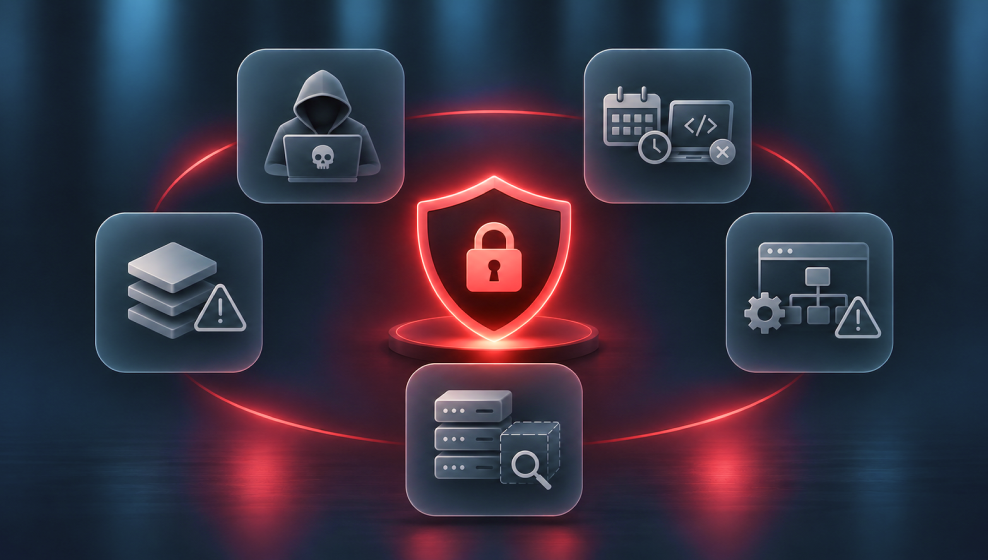
Every technology has a lifecycle. Developers release new versions, fix bugs, improve performance, and patch security vulnerabilities.
Eventually, older versions lose support. Their maintainers stop releasing updates, compatibility with modern tools gets worse, and documentation becomes harder to find.
Your application doesn’t suddenly stop working when this happens. That’s part of the problem. Everything may look fine while security risks quietly pile up.
Here are five situations where outdated technologies can put your software at risk.
1. Hackers Can Exploit Vulnerabilities Your Team Already Knows About
Security vulnerabilities aren’t always discovered during sophisticated attacks. Many are publicly documented, and developers release patches to fix them.
The problem? Companies don’t always install those patches.
An update might break an existing integration. The development team may have other priorities. Or nobody wants to touch an old application that already works. So the update gets postponed. Then postponed again.
Meanwhile, attackers are scanning the internet for systems running vulnerable software. Once they find one, they may already have everything they need to get started.
In October 2026, cybersecurity agencies warned about the active exploitation of two critical PHP vulnerabilities.
The flaws could allow attackers to execute malicious code remotely without authentication. This means they could potentially run commands on an affected server without having a valid account.
The problem was especially serious for companies using older PHP versions. Some had already reached end of life and no longer received official security patches.
The Canadian Centre for Cyber Security advised organizations using unsupported versions to upgrade or temporarily take affected systems offline.
Think about what this means for a business running an older web application. Even if the product has worked without issues for years, a newly exploited vulnerability can put its entire server at risk.
What to do: Keep track of the versions your application uses. Monitor security advisories and install relevant patches promptly. If a technology no longer receives updates, start planning its replacement.
2. Unsupported Technologies Leave Your Team Without a Safety Net
Let’s say your product runs on an older framework. Your developers know it well. The application works, customers are happy, and there’s no obvious reason to change anything.
Then the framework reaches end of life. The maintainers stop releasing security updates. A new vulnerability appears, but there’s no official fix for your version.
Now your developers have to figure out what to do. They might create a custom patch, find a workaround, or migrate the affected part of the application. All these options take time. And the longer you postpone modernization, the harder it can become.
There’s another issue here. Older technologies often become harder to work with because fewer developers have experience maintaining them. Finding someone who understands your legacy codebase can take longer and cost more.
What to do: Check the support status of your programming languages, frameworks, databases, and operating systems. Don’t wait until a security issue forces an urgent upgrade. Plan migrations around official end-of-life dates.
3. One Outdated Library Can Affect Your Entire Application
Most applications rely on third-party packages. They handle things like authentication, file uploads, payments, and data validation.
Using them saves development time. But every dependency also becomes something your team needs to maintain. And that’s the tricky part.
Your developers might update the libraries they use directly but overlook packages installed through other dependencies. These are called transitive dependencies. For example, your application uses a popular file-processing library. That library relies on several smaller packages. One of them has a known vulnerability. Your team might not even know that package exists. Yet its code is still running inside your application.
This is why checking only the main dependencies isn’t enough.
What to do: Run regular dependency scans and keep an inventory of your packages. Tools such as Snyk, Dependabot, and npm audit can help identify vulnerable components.
Make dependency checks part of your development workflow. It’s much easier to catch an outdated package during a regular review than during a security incident.
4. Legacy Architecture Makes Security Fixes Harder
An application launched ten years ago can look very different today. New features have been added. Developers have changed. Third-party services have been connected. Some modules have been replaced, while others still run on the original code. Over time, nobody may have a complete picture of how everything works.
This creates problems when your team needs to fix a security issue. For example, an old authentication module might be shared by several parts of the application. Updating it could affect customer accounts, admin permissions, and third-party integrations. Developers may hesitate to make changes because they don’t know what else could break.
Legacy architecture can also leave behind old API endpoints, unused accounts, and outdated access permissions.
In 2025, attackers exploited a zero-day vulnerability in Oracle E-Business Suite, a platform used by large organizations to manage business operations.
The vulnerability allowed attackers to access affected systems remotely. The Cl0p extortion group used the flaw in a campaign targeting corporate environments.
Google Threat Intelligence reported that attackers had been targeting vulnerable systems before the issue became public.
This case shows how much sensitive information can sit inside enterprise platforms. Financial records, employee information, and business processes often depend on the same connected systems. A security problem in one exposed component can create serious consequences across the organization.
What to do: Review your application architecture regularly. Map important data flows, check access permissions, and identify outdated modules.
If your team struggles to understand how different parts of the system connect, a technical audit can help uncover hidden dependencies and security risks.
5. Your Team Might Be Updating Most of Your Infrastructure and Still Missing Something
Here’s another problem with older systems: they don’t always show up where your team expects them.
A developer creates a temporary server. Someone sets up a virtual machine for testing. An old application stays online after a migration. Months later, these systems are still running. Nobody remembers who owns them, and nobody checks whether they’re receiving updates.
The SmarterTools incident is a good example. One virtual machine had fallen outside the company’s regular update process. Attackers found it and used a vulnerability in the outdated software to get into the network.
This is a common challenge for growing products. Infrastructure changes, teams expand, and new environments appear. Without a clear inventory, it’s easy to lose track of individual components. The attack affected 12 Windows servers across the company’s office network and a secondary data center. One forgotten virtual machine was enough to create a serious security problem.
What to do: Keep an up-to-date inventory of your servers, virtual machines, applications, and databases. Assign an owner to every system and include it in your regular update schedule. Automated asset discovery can also help find installations your team might have overlooked.
How to Tell If Your Software Needs a Technology Upgrade
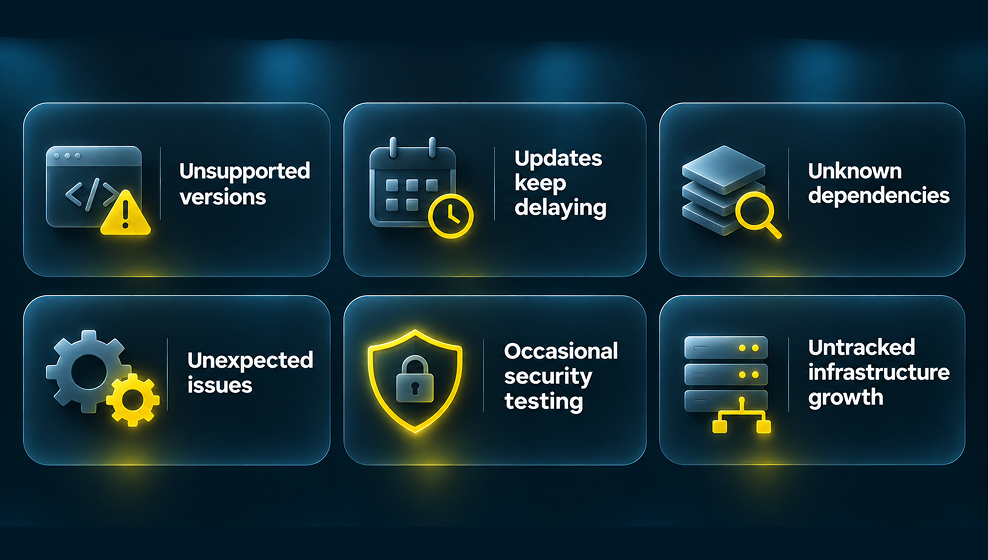
You don’t need to wait for a security incident to check your technology stack.
There are several signs that your application could use a closer look.
- Your software uses unsupported versions. Some frameworks, databases, or programming languages have reached end of life and no longer receive security updates.
- Your team keeps postponing updates. Developers know certain components need attention, but compatibility problems keep delaying the work.
- Nobody knows the full dependency list. Documentation is incomplete, and developers can’t easily identify every library or service used by the application.
- Small changes create unexpected issues. Updating one package affects several modules, or fixing one bug breaks another feature.
- Security testing happens occasionally. Vulnerability scans, access reviews, and penetration tests aren’t part of the regular development process.
- Your infrastructure has grown without proper documentation. New servers, integrations, and services have been added, but nobody has reviewed the full environment recently.
If several of these sound familiar, it’s worth taking a closer look at your software.Prepare the plan for the infrastructure audit, concrete next steps of adjustments and fixes, and put it into your scope of work for the next quarter.
What to Do About Outdated Technologies
Finding outdated components is easy enough. The harder part is knowing where to start and how much you actually need to change.
Nobody wants to pause product development for six months just to replace your technology stack. Fortunately, modernization doesn’t always mean rebuilding everything.
You can start with five practical steps that help bring your tech stack up to date without putting development on hold.
1. Find Out What You’re Actually Running
Start with a complete inventory of your software. Check your programming languages, framework versions, databases, third-party packages, servers, and external integrations. If there’s no documentation, take some time to put it together. Write down what each component does, how everything connects, and which versions you’re using. It’ll save your team a lot of guesswork the next time you need to fix something or update the system. Look for components that have reached end of life or haven’t received security updates in a long time.
Don’t forget about older services and testing environments. They can create security risks just like your production application.
The goal is to understand what needs attention before making changes.
2. Deal With the Most Serious Vulnerabilities First
You don’t need to replace every outdated component right away. Start with vulnerabilities that could cause the most damage. For example, a vulnerability in a public-facing app that attackers can exploit remotely needs attention sooner than an outdated internal tool with limited access.
Look at how easy each vulnerability is to exploit, whether attackers are already using it, and what data or systems could be affected. This helps your team decide what to fix first and what can wait.
3. Make Updates Part of Your Development Routine
Waiting for someone to remember an update is a poor long-term strategy.
Use automated tools to monitor dependencies and detect known vulnerabilities. Set up regular scans and include security checks in your CI/CD pipeline.
But don’t install every update without testing it. A new package version can introduce compatibility issues or change existing functionality. Run automated tests and check important user flows before deploying changes.
For critical systems, consider regular penetration testing too.
4. Modernize Your Technology Stack When Necessary
Sometimes, a few package updates won’t be enough. The problem may run much deeper than that.
Your application might depend on a framework that no longer gets updates, an old database that’s difficult to work with, or an architecture that makes even small changes complicated.
When that happens, it may be time to look at modernizing the product itself.
The scope can vary quite a bit:
- Incremental upgrades: Replace outdated components one by one while keeping the application running.
- Refactoring: Clean up the existing code and improve its structure without rebuilding the product.
- Replatforming: Move the application to a newer framework, database, or infrastructure.
- Rebuilding: Start fresh when the old system has become too costly or difficult to maintain.
The best approach depends on how the product works today, what needs to change, and how much time and money the business can invest.
For example, BandaPixels worked on Diveboard, an established online platform for scuba divers. Its old Python technology needed an update, so our team moved the product to a modern web stack and expanded its functionality. The result was a modernized platform with broader functionality and support for offline use, without losing sight of what divers needed from the product.
A project modernization also gives the team a chance to review dependencies, improve the architecture, and address security issues as part of the work.
5. Give Someone Ownership of Security Maintenance
Even a modern technology stack needs regular attention. New vulnerabilities appear, dependencies change, and infrastructure evolves. Your team needs a process for keeping everything up to date.
Make sure someone is responsible for monitoring security advisories, reviewing alerts, and making sure critical fixes reach production.
A regular maintenance routine should include:
- Dependency and vulnerability scans.
- Timely security patches.
- Access permission reviews.
- Automated tests after updates.
- Security monitoring and incident alerts.
- Regular backups and recovery checks.
- Periodic penetration testing.
It’s also worth documenting an incident response plan. Your team should know who to contact and what steps to take if something goes wrong.
How AI Is Changing the Security Risks of Outdated Software
Old code has always been difficult to secure. Developers have to understand how it works, track down dependencies, and figure out which parts could expose the application to attack.
AI is making some of that work much faster. Security researchers can use AI tools to scan large codebases, spot suspicious patterns, and investigate vulnerabilities. Attackers can use similar tools to study software, identify weak points, and automate parts of an attack.
That creates a problem for businesses running older systems. A vulnerability that once took considerable time and expertise to investigate may now be easier to find and exploit. And if the software no longer receives security updates, the team may have fewer options for fixing it.
AI also changes the amount of time attackers may need to find a weakness. They can use AI to understand unfamiliar code, test different approaches, and write scripts for exploiting vulnerabilities. That puts extra pressure on teams responsible for older applications, especially when they have limited time to investigate security issues.
In May 2026, Google Threat Intelligence Group reported a cybercriminal operation involving an AI-assisted zero-day exploit. The attacker used AI to help develop an exploit for a vulnerability in a widely used open-source system administration tool. The flaw allowed someone with valid login credentials to bypass two-factor authentication.
Google said this was the first publicly confirmed case it had identified of a criminal using an AI-developed zero-day exploit. The company alerted the affected vendor and helped disrupt the activity before it caused known damage.
The interesting part is how AI changed the process. The attacker didn’t need to invent a completely new attack method. AI helped turn a weakness in an existing authentication flow into a working exploit.
For companies with older software, this is worth paying attention to. A vulnerability in an overlooked component can become a much bigger problem when attackers have better tools for finding and exploiting it. And if that component no longer receives updates, fixing the issue may take considerably longer.
AI can help developers catch these problems, too. Teams can use it to review unfamiliar code, check dependencies, investigate security alerts, and understand how a proposed fix might affect the application. It can also help developers working with legacy systems find code they don’t know well.
But AI suggestions need to be checked. A tool may miss how different parts of an application interact, recommend an unsafe change, or overlook a problem elsewhere in the system. Developers still need to test fixes, review the results, and make the final security decisions.
For teams maintaining older products, AI can speed up security work. It can’t replace regular updates, proper testing, or a clear plan for dealing with unsupported technology.
Final Thoughts
The SmarterTools, Oracle, and PHP cases show how different technical issues can put businesses at risk.
One forgotten server, an exposed enterprise platform, or an unsupported software version can give attackers an opportunity to access critical systems.
And you don’t always need a complete technology overhaul to reduce these risks.
Start by checking what your software actually runs on. Review dependencies, identify unsupported components, and deal with critical vulnerabilities first.
If your current technology stack is becoming difficult to maintain, consider a gradual modernization plan.
At BandaPixels, we help businesses build, modernize, and maintain custom software. Our software development team can assess your existing product, identify technical risks, and recommend practical improvements.
Your software may be working fine today. Make sure the technology behind it is ready for tomorrow, too.
Let's work together to make your project a success
Contact usRelated News


Last News
Thank you!
We’ve received your contact request and will contact you soon
Something went wrong
We couldn’t receive your contact request. Please try again later.