How to Calculate AI ROI: What to Spend, What to Measure, and When It Pays Off
Faster workflows, lower costs, better results. Does AI actually deliver on these promises? It all comes down to how you measure ROI.
29 October, 2026
How to Calculate AI ROI: What to Spend, What to Measure, and When It Pays Off
AI can save your team hours of work, speed up product development, and help you serve more customers without hiring at the same pace. Sounds like a good investment.
But using AI doesn’t automatically mean your business is saving money.
You might pay for several AI subscriptions, spend weeks integrating a model into your product, and still struggle to explain what the investment has actually changed. Your team might finish individual tasks faster while spending more time checking AI outputs, fixing mistakes, and dealing with new technical issues.
So, how do you know if AI is worth the money?
The answer comes down to a few practical questions:
- What problem are you solving?
- How much does the solution really cost?
- What measurable result does it deliver?
- And does that result justify the investment?
Let’s break down how to calculate AI ROI, decide how much to spend, and figure out whether AI is making a real difference to your business.
Why AI ROI Is Harder to Measure Than It Looks
The easiest way to measure AI’s impact is to look at how much faster it completes a task. But speed is only one part of the equation.
Say your support team starts using AI to draft customer replies. A task that used to take 10 minutes now takes four. That’s a 60% reduction in drafting time.
Great. But what happens next?
Someone still needs to review the reply. Some answers need corrections. The team might handle the same number of tickets as before because demand hasn’t changed. And if the company pays for the AI tool, the savings need to cover that cost, too.
The actual business impact depends on what happens to the time saved.
- Does the team handle more requests?
- Can it focus on complicated customer problems?
- Does the company need fewer overtime hours?
- Are customers getting better service?
These are the outcomes worth measuring.
The same principle applies to software development. AI can generate code quickly, but shipping code isn’t the same as shipping reliable software. Developers still need to review the output, test it, check security, and make sure it fits the existing architecture. AI can write code, but it still can’t build your product without engineering judgment.
So, before investing in AI, look beyond the time saved on individual tasks. Connect that time to something your business actually values.
How to Calculate AI ROI
Let’s start with the basic formula:
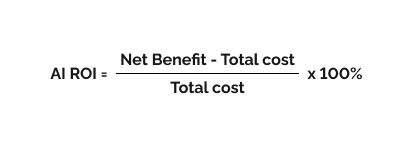
Net benefit is the financial value AI creates before subtracting the investment cost. Total cost includes everything you spend to implement and run it.
For example, imagine your company introduces an AI tool to automate part of its customer support workflow.
Over one month, the tool helps reduce manual work worth $4,000. However, subscriptions, integration, maintenance, and additional review work cost $2,500.
Your ROI would be:
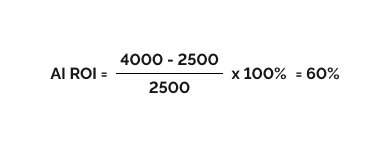
That’s a 60% return on your investment for the period measured.
The important part is calculating both sides honestly. If you count every hour saved as a financial gain but ignore the costs of reviewing AI output, your ROI will look better than it really is.
What counts as an AI benefit?
AI creates value in several ways, and not all of them show up as immediate cost savings.
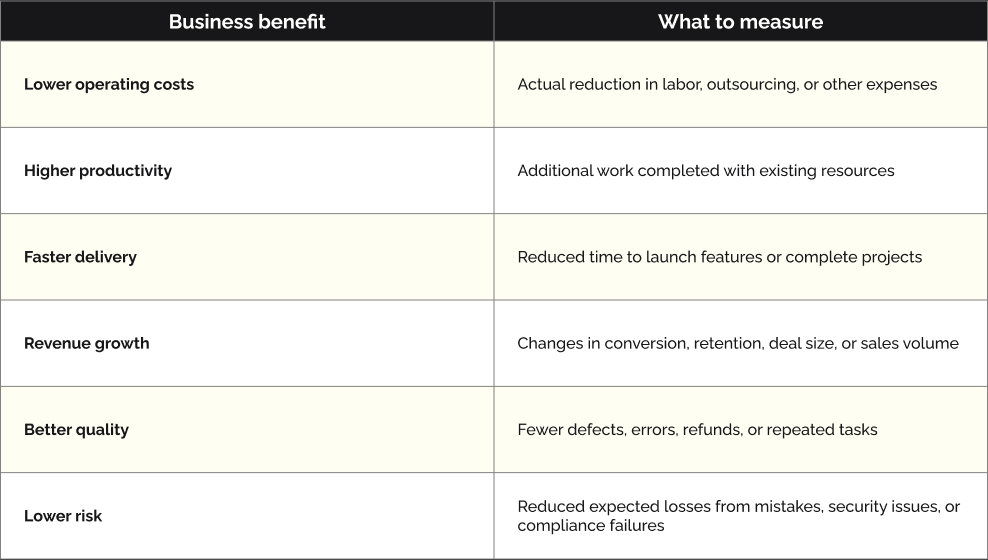
One important distinction: time saved isn’t automatically money saved.
If AI frees up 100 hours but your payroll stays the same, you haven’t necessarily reduced costs. However, if those hours help your team deliver another feature, serve more customers, or avoid hiring additional people, the time saved can create measurable financial value.
Choose the benefits that match your business goal. You don’t need to assign a dollar value to every possible improvement.
What Costs Should You Include in Your AI Budget?
One of the most common budgeting mistakes is focusing on the price of the AI tool itself.
A subscription might cost $30 per user per month. An API might charge a fraction of a cent for a request. Those numbers look manageable until you connect the technology to your actual business processes.
The full cost of AI usually includes several layers.
AI tools and model usage
Subscription fees, API calls, tokens, model hosting, and additional computing resources. Costs can grow with usage, so estimate them at your expected operating volume.
Data preparation and infrastructure
Data cleanup, storage, pipelines, access permissions, and the infrastructure needed to make company information usable by AI.
Development and integration
Connecting AI to your CRM, ERP, internal tools, or customer-facing product. This also includes testing, security checks, and changes to existing workflows.
People and training
Employee onboarding, developer time, AI output reviews, process redesign, and the effort required to help people use the system effectively.
Ongoing maintenance and risk management
Monitoring, model updates, bug fixes, data protection, compliance, and handling incorrect or unexpected outputs.
Some projects need only a few of these components. Others require more work upfront before the AI itself becomes useful.
For instance, a team using an AI assistant to summarize internal documents may need little custom development. A company building an AI system that processes insurance claims across several existing platforms will face a much larger integration and governance effort.
This is why estimating AI costs without understanding the use case rarely produces a reliable budget.
How Much Should You Spend on AI?

There’s no universal percentage of revenue that every company should invest in AI. A small business automating routine admin tasks has very different needs from a software company building AI into its core product.
Instead of starting with a large budget, start with a specific business problem and fund a small experiment.
Here’s a practical way to approach it.
01 Start with an existing tool
Try an off-the-shelf AI tool for a clearly defined task. This could be summarizing documents, drafting support replies, or helping developers write repetitive code. Track usage and results before paying for more seats or additional services.
02 Run a limited pilot
Pick one workflow, one team, or one part of your product. Set a spending limit, define success metrics, and test the solution with real users. Include the cost of engineering and integration if custom work is required.
03 Expand when the numbers support it
If the pilot produces consistent results, estimate what happens when usage grows tenfold or reaches the entire organization. Check model costs, infrastructure, accuracy, support needs, and whether the benefits will scale with usage.
A good pilot budget should cover enough time and usage to test the real workflow, not just produce an impressive demo. For some tasks, that may take a few weeks. More complex projects may need several months to account for integrations, user adoption, and operational edge cases.
A simple way to set your spending limit
Estimate the financial value you could reasonably gain from the use case. Then decide how much of that potential value you’re willing to invest in testing it.
For example, if a workflow could realistically generate $5,000 in monthly benefits, you might set a pilot budget of $2,000–$3,000 to test whether those benefits are achievable.
These numbers are just illustrative, not industry standards. How much you should spend depends on how complex the project is, how much work it takes, and what happens if things don’t go as planned.
The key is to agree on the limit before development starts. Otherwise, a promising experiment can turn into an open-ended project with no clear business case.
How to Measure Whether AI Is Actually Working
Once your pilot is live, you need a way to compare its performance with the process you had before.
Start by recording the current numbers. Without a baseline, you won’t know whether AI improved anything.
For most projects, three to five KPIs are enough to start.
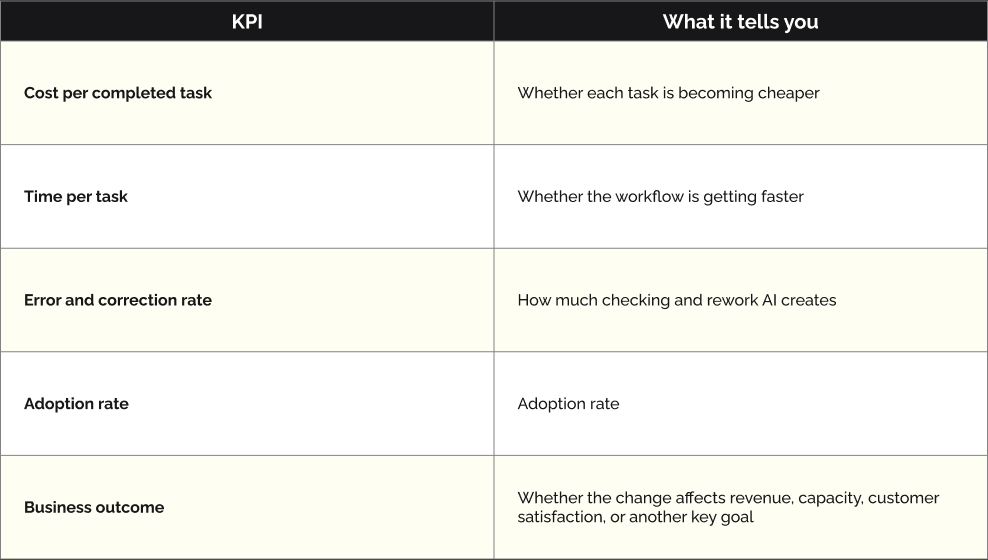
Let’s look at how these metrics work in practice.
Imagine a support team processes 2,000 tickets per month. Before AI, each ticket takes an average of 12 minutes to handle. After introducing AI-assisted replies, that falls to seven minutes, including review.
The team saves five minutes per ticket.
- Monthly time saved: 2,000 × 5 minutes = 166.7 hours.
- At an illustrative loaded labor cost of $24 per hour, that’s about $4,000 in monthly capacity.
- If AI subscriptions and ongoing operating costs total $900 per month, the apparent net benefit is $3,100.
That looks promising. But there’s one more question: what does the team do with those 166.7 hours?
If employees use the extra capacity to handle more tickets, reduce the backlog, or improve service quality, the investment may be worthwhile. If the team doesn’t need the extra capacity and no costs or other outcomes improve, the financial return may be much smaller than the calculation suggests.
This is why ROI should connect productivity metrics to actual business results.
How to Calculate AI ROI for Software Development
For companies building software products, AI ROI deserves a slightly different approach.
AI coding assistants can help developers write boilerplate, generate tests, explore unfamiliar codebases, and speed up routine implementation. But the value depends on the entire development process, not just how quickly code appears.
A useful way to measure the impact is to track the following:
- Delivery speed: How long does it take to ship a feature from an agreed scope to production?
- Code quality: Are defect rates, production incidents, and rework increasing or decreasing?
- Engineering capacity: Can the team deliver more useful functionality with the same resources?
- Maintenance effort: Does AI-generated code remain understandable and easy to change?
- Total cost per release: How much does it cost to deliver and maintain a working feature?
To get a clearer picture of AI ROI, connect model costs directly to completed work. For example, track API token costs from providers like OpenAI or Anthropic against Jira tickets, epics, or features delivered. This helps understand how much it actually costs to ship a feature, rather than relying on metrics like token usage or commit counts alone.
It’s also worth comparing AI-assisted tasks with similar tasks completed without AI. Look at both delivery time and total cost, including developer hours, token usage, testing, and code review. This gives you a more reliable basis for calculating ROI and seeing whether AI is making development more efficient financially.
For example, suppose a development team uses AI to cut the initial implementation time for a feature from 40 hours to 25 hours. That’s a 37.5% reduction in coding time.
However, if testing and code review require another 20 hours instead of the previous 10, the total time rises from 50 to 45 hours. The real improvement is 10%, not 37.5%. If the team also spends more on tokens or additional AI requests, the financial return may be smaller than expected.
And if the feature creates additional bugs that take weeks to fix, the apparent gain may disappear altogether.
The same principle applies to AI-powered product features. Faster development is useful, but it needs to translate into something customers value and the business can sustain.
At BandaPixels, we see AI as a way to remove repetitive tasks so engineers can spend more time on architecture, code quality, and product decisions. After all, writing code faster doesn’t automatically mean building a better product. That takes a clear understanding of what users need and how to turn those needs into software that works in the real world.
When Should You Scale, Improve, or Stop an AI Project?

After the pilot, you need to make a decision. Don’t keep investing simply because the team has already spent money on development.
Use the evidence to choose your next step.
Scale it
Results are consistent, the business benefit exceeds the full cost, users have adopted the solution, and quality remains acceptable under real operating conditions.
Improve it
The use case is valuable, but the system needs better data, stronger integrations, a different model, or a simpler workflow to deliver the expected return.
Stop it
Costs keep exceeding benefits, accuracy remains poor, adoption is low, or a simpler non-AI solution can achieve the same result for less.
Review the numbers regularly after launch, too. Model prices, usage patterns, business needs, and AI performance can change. A project that makes financial sense today may need adjustments as its workload grows.
Also, don’t limit the review to cost savings. Some AI initiatives create value through better customer experiences, faster product releases, or new revenue opportunities. Those benefits still need evidence, even if they’re harder to measure than a subscription bill.
Invest in Outcomes, Not AI for AI’s Sake
AI can be a great investment. It can help teams move faster, automate repetitive work, and build new product capabilities. But the financial return depends on the problem you’re solving and how well the solution fits into your business.
Start with one use case. Record the current cost, time, and quality of the process. Set a realistic budget, include the less obvious expenses, and measure what changes after implementation.
Then make the decision based on evidence.
If AI saves time but creates more rework, fix the workflow. If a simple tool delivers enough value, you don’t need a custom system. And if the results justify a larger investment, scale with a clear understanding of the costs and expected benefits.
At BandaPixels, we help businesses understand which tech options make sense, build custom software, and connect new features with the tools they already use. If you’re thinking about adding AI to your product, we can help you assess the idea, understand how much work it might take, and decide whether it’s worth the investment.
In the end, AI makes sense when it actually helps your business. Start small, keep an eye on the numbers, and give yourself time to see what works. Some ideas will pay off, others won’t. The important thing is to know where your budget goes, avoid spending money on technology that doesn’t deliver real value and make your next move based on what you’ve learned.
Let's work together to make your project a success
Contact usRelated News



Last News
Thank you!
We’ve received your contact request and will contact you soon
Something went wrong
We couldn’t receive your contact request. Please try again later.